top of page
Overpass Turbo
Overpass Turbo uses Open Street Map data to create an interactable map.
How does it work?
Overpass Turbo uses OpenStreetMap data to search for specific places and things. OpenStreetMaps has data submitted by people all over the world this data includes things like public toilets, restaurants, parks, and even trees. When you use Overpass Turbo, you’re asking it to search that data for specific things.
Here’s how Overpass Turbo works. When you write your Overpass Query in the search box and press run Overpass Turbo sends it to the OpenStreetMaps database. This database stores all of the OpenStreetMaps data in categories. For example, a park is tagged “leisure=park” and a school is tagged “amenity=school”. Overpass Turbo looks for these tags and finds all the places on the map with that tag.
Once Overpass Turbo finds this data, Overpass Turbo shows you all the places highlighted on an interactive map. After that you can share it and export the information. If you decide to export it, it will export it as a .KML file and you can insert the file into google maps or a different mapping site and it will show all the highlighted areas.

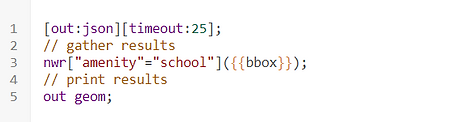

What is it used for?
Overpass Turbo is used to find data worldwide. Its database contains more information than Google Maps which is the main reason why it is used. In Overpass Turbo you can filter for different places much more effectively than Google Maps. A good thing about Overpass Turbo is that it displays the information in an interactive map and not as a list.
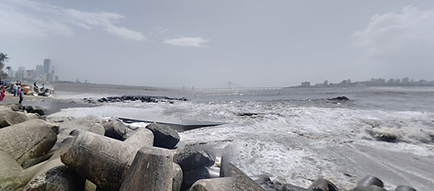
Overpass Turbo is professionally used for geolocation jobs a good example is if you work the police and this person is a suspect, and you need to know where this photo is to track him down. You would first look at the background and see the bridge. You can assume that he is on the shore about 2km away from the bridge and looking at the cargo ships there would be a cargo port nearby. You would then go to Overpass Turbo and search for all bridges 2km away from a shore near a cargo port. That will narrow down your search and save a lot of time.


bottom of page